











Round Up
Building financial slack has never been easier. With our Round Up feature you don’t have to think about saving money, it just happens automatically. You check your savings account and see new deposits helping you build slack.

Save with every swipe
Round Up allows eligible members to effortlessly save money by rounding up debit card transactions to the nearest whole dollar. The excess amount is transferred to a designated savings account. You must have an eligible checking account with Credit Human to participate.

No overdraft
Round Up won’t overdraw your checking account. If your checking account has enough funds to round up, it will. If it doesn’t, it won’t.

How to add Round Up to your account
Activate Round Up from your checking account page within digital banking. You can also add this feature in person at a Financial Health Center or over the phone.
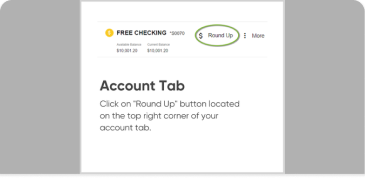
Account tab
Click on “Round Up” button located at the top right corner of your account tab.
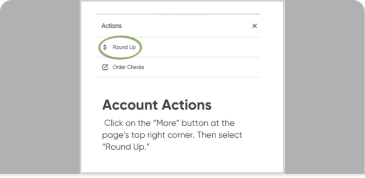
Account actions
Click on the “More” button at the page’s top right corner. Then select “Round Up.”
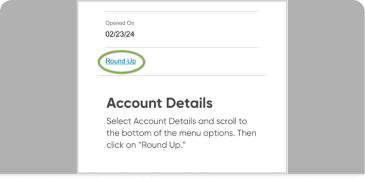
Account details
Select Account Details and scroll to the bottom of the menu options. Then click on “Round Up.”